> ## Documentation Index
> Fetch the complete documentation index at: https://docs-dev-docs-ia-custom-database-connections.mintlify.site/llms.txt
> Use this file to discover all available pages before exploring further.

> Learn how to configure an update policy form using Forms for Actions for users to review and accept new terms of service or consent updates.

# Use Cases: Configure an update policy form using Forms

<Card title="Before you start">
  1. Create a [Machine-to-Machine Application](/docs/get-started/auth0-overview/create-applications/machine-to-machine-apps) with the following scopes enabled:

  * `read:users`
  * `update:users`
  * `create:users`
  * `read:users_app_metadata`
  * `update:users_app_metadata`
  * `create:users_app_metadata`

  2. Add a [Vault connection](/docs/customize/forms/vault) using the M2M application credentials.
</Card>

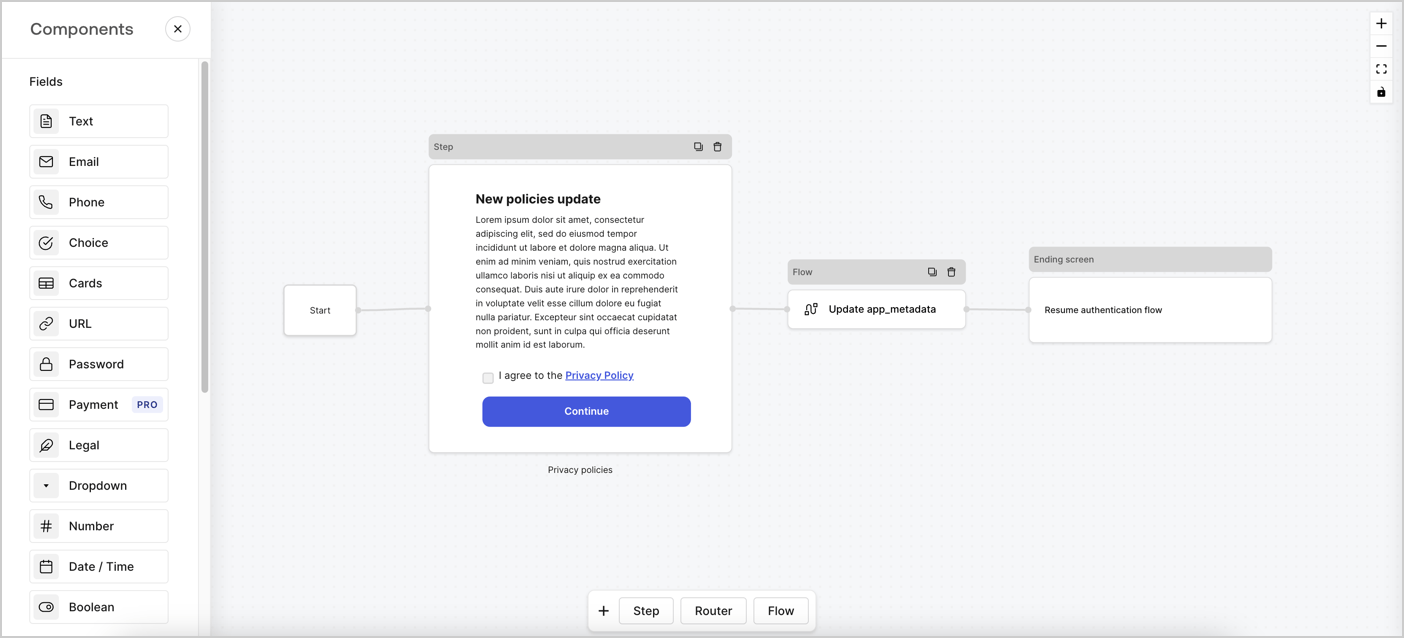
Forms for Actions allows you to create custom privacy policies flows and store the consent under the `app_metadata` object.
<Frame>
  <img src="https://mintcdn.com/docs-dev-docs-ia-custom-database-connections/roCEYr1xi1eoO5-8/docs/images/cdy7uua7fh8z/6i68dMvHDTijfRmSgN1x8Q/ad900e7d4c0fb34645921435472b8684/privavy-policy-form.png?fit=max&auto=format&n=roCEYr1xi1eoO5-8&q=85&s=af8d0471f958e2a24967f9f54a18bff1" alt="Dashboard > Actions > Forms > Privacy policy use case" data-og-width="1404" width="1404" data-og-height="638" height="638" data-path="docs/images/cdy7uua7fh8z/6i68dMvHDTijfRmSgN1x8Q/ad900e7d4c0fb34645921435472b8684/privavy-policy-form.png" data-optimize="true" data-opv="3" srcset="https://mintcdn.com/docs-dev-docs-ia-custom-database-connections/roCEYr1xi1eoO5-8/docs/images/cdy7uua7fh8z/6i68dMvHDTijfRmSgN1x8Q/ad900e7d4c0fb34645921435472b8684/privavy-policy-form.png?w=280&fit=max&auto=format&n=roCEYr1xi1eoO5-8&q=85&s=353f55db6740165ea073be18330c0a12 280w, https://mintcdn.com/docs-dev-docs-ia-custom-database-connections/roCEYr1xi1eoO5-8/docs/images/cdy7uua7fh8z/6i68dMvHDTijfRmSgN1x8Q/ad900e7d4c0fb34645921435472b8684/privavy-policy-form.png?w=560&fit=max&auto=format&n=roCEYr1xi1eoO5-8&q=85&s=2ce09615755bf48cc533c57239adce08 560w, https://mintcdn.com/docs-dev-docs-ia-custom-database-connections/roCEYr1xi1eoO5-8/docs/images/cdy7uua7fh8z/6i68dMvHDTijfRmSgN1x8Q/ad900e7d4c0fb34645921435472b8684/privavy-policy-form.png?w=840&fit=max&auto=format&n=roCEYr1xi1eoO5-8&q=85&s=9b04928554fef2a7ac1382377016ab4b 840w, https://mintcdn.com/docs-dev-docs-ia-custom-database-connections/roCEYr1xi1eoO5-8/docs/images/cdy7uua7fh8z/6i68dMvHDTijfRmSgN1x8Q/ad900e7d4c0fb34645921435472b8684/privavy-policy-form.png?w=1100&fit=max&auto=format&n=roCEYr1xi1eoO5-8&q=85&s=16f5f651c9b0f6a8150b5c9ac43a47e9 1100w, https://mintcdn.com/docs-dev-docs-ia-custom-database-connections/roCEYr1xi1eoO5-8/docs/images/cdy7uua7fh8z/6i68dMvHDTijfRmSgN1x8Q/ad900e7d4c0fb34645921435472b8684/privavy-policy-form.png?w=1650&fit=max&auto=format&n=roCEYr1xi1eoO5-8&q=85&s=347449ccb907ab14887f3a098964c8a4 1650w, https://mintcdn.com/docs-dev-docs-ia-custom-database-connections/roCEYr1xi1eoO5-8/docs/images/cdy7uua7fh8z/6i68dMvHDTijfRmSgN1x8Q/ad900e7d4c0fb34645921435472b8684/privavy-policy-form.png?w=2500&fit=max&auto=format&n=roCEYr1xi1eoO5-8&q=85&s=362ea97971d418c46231a33a8b4b010f 2500w" />
</Frame>

The sections below outline how you can create an Update Policy form using nodes and flows, along with steps for adding your form to a [Post Login](/docs/customize/actions/explore-triggers/signup-and-login-triggers/login-trigger) Action.

## Create a form from scratch

Follow these steps to create a form to gather information:

1. Open the Form editor by selecting **Auth0 Dashboard > Actions > Forms.**
2. Select **Create Form** > **Start from scratch**.

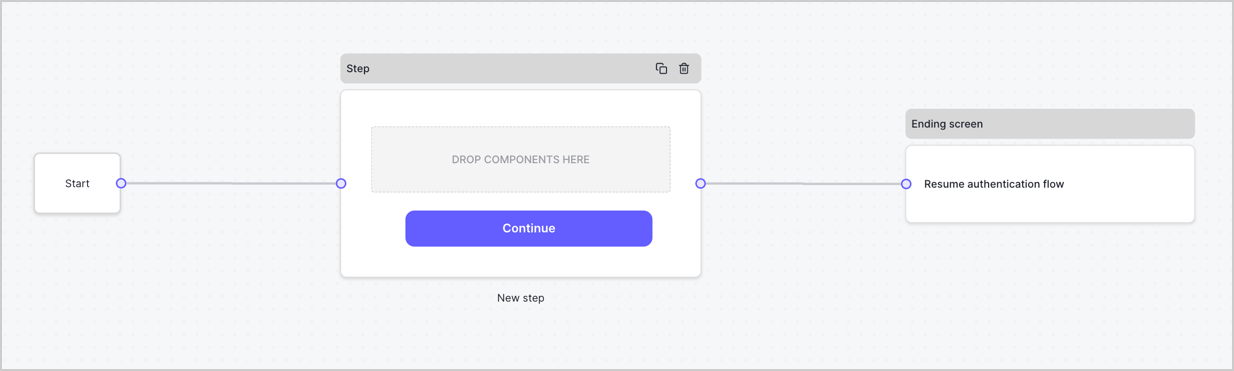
By default, a new form contains a Start node, a Step node, and an Ending screen node.
<Frame>
  <img src="https://mintcdn.com/docs-dev-docs-ia-custom-database-connections/68oR74T59vPkIFqf/docs/images/cdy7uua7fh8z/2TZ9jSjgEcARFpULI6hz4R/a4319a1bd482f2ee5cc23100fdb2f42c/New-form-Forms-for-action-use-case.png?fit=max&auto=format&n=68oR74T59vPkIFqf&q=85&s=17554d263ad82233d88b8d7a5c65e910" alt="Dashboard > Forms > Use Cases > Form" data-og-width="1234" width="1234" data-og-height="371" height="371" data-path="docs/images/cdy7uua7fh8z/2TZ9jSjgEcARFpULI6hz4R/a4319a1bd482f2ee5cc23100fdb2f42c/New-form-Forms-for-action-use-case.png" data-optimize="true" data-opv="3" srcset="https://mintcdn.com/docs-dev-docs-ia-custom-database-connections/68oR74T59vPkIFqf/docs/images/cdy7uua7fh8z/2TZ9jSjgEcARFpULI6hz4R/a4319a1bd482f2ee5cc23100fdb2f42c/New-form-Forms-for-action-use-case.png?w=280&fit=max&auto=format&n=68oR74T59vPkIFqf&q=85&s=e819eaf69269dfd4d16cad3da22510e0 280w, https://mintcdn.com/docs-dev-docs-ia-custom-database-connections/68oR74T59vPkIFqf/docs/images/cdy7uua7fh8z/2TZ9jSjgEcARFpULI6hz4R/a4319a1bd482f2ee5cc23100fdb2f42c/New-form-Forms-for-action-use-case.png?w=560&fit=max&auto=format&n=68oR74T59vPkIFqf&q=85&s=3468923eaf3ca5b68b874efa4007828f 560w, https://mintcdn.com/docs-dev-docs-ia-custom-database-connections/68oR74T59vPkIFqf/docs/images/cdy7uua7fh8z/2TZ9jSjgEcARFpULI6hz4R/a4319a1bd482f2ee5cc23100fdb2f42c/New-form-Forms-for-action-use-case.png?w=840&fit=max&auto=format&n=68oR74T59vPkIFqf&q=85&s=ee83132c99e649fb63a808ce8e09dce1 840w, https://mintcdn.com/docs-dev-docs-ia-custom-database-connections/68oR74T59vPkIFqf/docs/images/cdy7uua7fh8z/2TZ9jSjgEcARFpULI6hz4R/a4319a1bd482f2ee5cc23100fdb2f42c/New-form-Forms-for-action-use-case.png?w=1100&fit=max&auto=format&n=68oR74T59vPkIFqf&q=85&s=85cedfc4c7b51f95336fd7d829aa87e2 1100w, https://mintcdn.com/docs-dev-docs-ia-custom-database-connections/68oR74T59vPkIFqf/docs/images/cdy7uua7fh8z/2TZ9jSjgEcARFpULI6hz4R/a4319a1bd482f2ee5cc23100fdb2f42c/New-form-Forms-for-action-use-case.png?w=1650&fit=max&auto=format&n=68oR74T59vPkIFqf&q=85&s=a77fc46efb2951b4f5cfbb4106de185d 1650w, https://mintcdn.com/docs-dev-docs-ia-custom-database-connections/68oR74T59vPkIFqf/docs/images/cdy7uua7fh8z/2TZ9jSjgEcARFpULI6hz4R/a4319a1bd482f2ee5cc23100fdb2f42c/New-form-Forms-for-action-use-case.png?w=2500&fit=max&auto=format&n=68oR74T59vPkIFqf&q=85&s=89efd894118d52dbc81406ff87928b53 2500w" />
</Frame>

### Configure the Step node

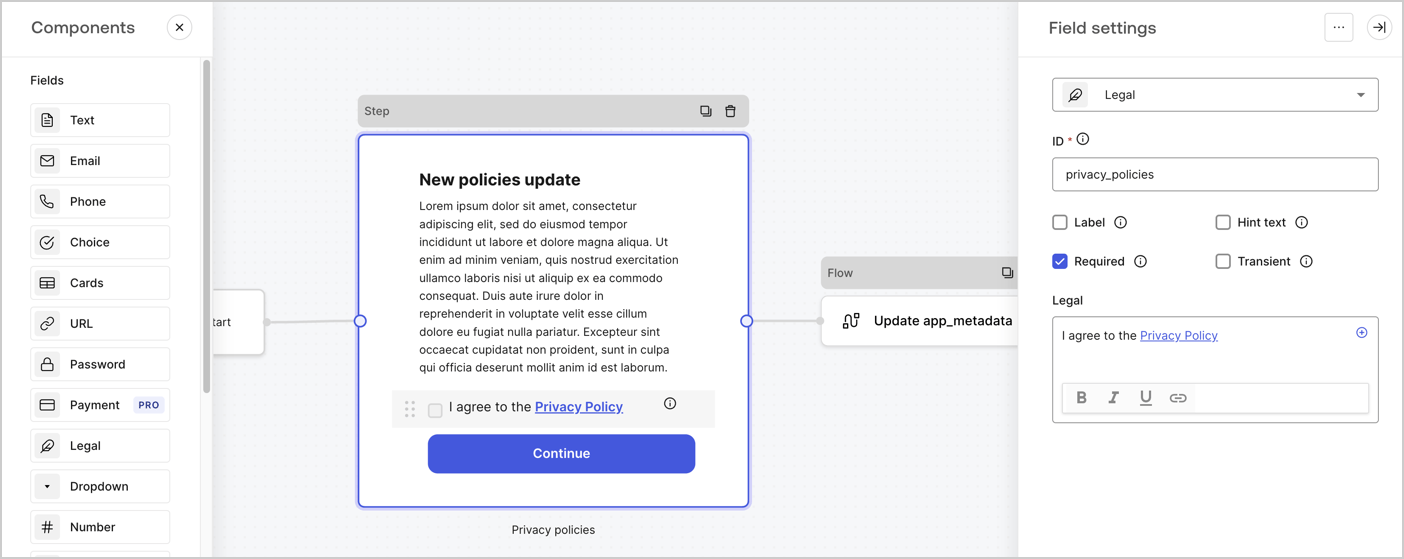
The Step node is the graphical interface visible to users. Add [Fields](/docs/customize/forms/nodes-and-components) to the Step node to collect the new agreement acceptance value by following these steps:

1. Drag a **Rich text** field from the **Components menu** into the **Step** node.

   * **Rich text**: Enter a description of your privacy policies updates.
   * Select **Save**.
2. Drag a **Legal** field into the **Step** node.

   * **ID**: Enter `privacy_policies`.
   * **Required**: Enable the checkbox.
   * **Legal**: Enter `I agree to the Privacy Policy`.
   * Select **Save**.
3. Select **Publish** to save.
<Frame>
  <img src="https://mintcdn.com/docs-dev-docs-ia-custom-database-connections/Hk2YjHVeMSf2YISQ/docs/images/cdy7uua7fh8z/59zFFjQjAnjogkc2QGIqqJ/0ad66b1b636544122aa4e65968b76c2c/privacy-policy-step-node.png?fit=max&auto=format&n=Hk2YjHVeMSf2YISQ&q=85&s=6f001448e91660a9e230daf3d4d6cbdf" alt="Dashboard > Actions > Forms > Use case privacy policy step node" data-og-width="1404" width="1404" data-og-height="559" height="559" data-path="docs/images/cdy7uua7fh8z/59zFFjQjAnjogkc2QGIqqJ/0ad66b1b636544122aa4e65968b76c2c/privacy-policy-step-node.png" data-optimize="true" data-opv="3" srcset="https://mintcdn.com/docs-dev-docs-ia-custom-database-connections/Hk2YjHVeMSf2YISQ/docs/images/cdy7uua7fh8z/59zFFjQjAnjogkc2QGIqqJ/0ad66b1b636544122aa4e65968b76c2c/privacy-policy-step-node.png?w=280&fit=max&auto=format&n=Hk2YjHVeMSf2YISQ&q=85&s=e069aabdc6ddf7fa86206a2dcb2d2b1f 280w, https://mintcdn.com/docs-dev-docs-ia-custom-database-connections/Hk2YjHVeMSf2YISQ/docs/images/cdy7uua7fh8z/59zFFjQjAnjogkc2QGIqqJ/0ad66b1b636544122aa4e65968b76c2c/privacy-policy-step-node.png?w=560&fit=max&auto=format&n=Hk2YjHVeMSf2YISQ&q=85&s=d6ee26088024d2ca9b51a9eea9aea35f 560w, https://mintcdn.com/docs-dev-docs-ia-custom-database-connections/Hk2YjHVeMSf2YISQ/docs/images/cdy7uua7fh8z/59zFFjQjAnjogkc2QGIqqJ/0ad66b1b636544122aa4e65968b76c2c/privacy-policy-step-node.png?w=840&fit=max&auto=format&n=Hk2YjHVeMSf2YISQ&q=85&s=6ca9c6a8857de5176e8acfc59e11f969 840w, https://mintcdn.com/docs-dev-docs-ia-custom-database-connections/Hk2YjHVeMSf2YISQ/docs/images/cdy7uua7fh8z/59zFFjQjAnjogkc2QGIqqJ/0ad66b1b636544122aa4e65968b76c2c/privacy-policy-step-node.png?w=1100&fit=max&auto=format&n=Hk2YjHVeMSf2YISQ&q=85&s=983f43085e934476cf95242275811293 1100w, https://mintcdn.com/docs-dev-docs-ia-custom-database-connections/Hk2YjHVeMSf2YISQ/docs/images/cdy7uua7fh8z/59zFFjQjAnjogkc2QGIqqJ/0ad66b1b636544122aa4e65968b76c2c/privacy-policy-step-node.png?w=1650&fit=max&auto=format&n=Hk2YjHVeMSf2YISQ&q=85&s=f42aff483ebbfb5b9a0bfddb16c8196c 1650w, https://mintcdn.com/docs-dev-docs-ia-custom-database-connections/Hk2YjHVeMSf2YISQ/docs/images/cdy7uua7fh8z/59zFFjQjAnjogkc2QGIqqJ/0ad66b1b636544122aa4e65968b76c2c/privacy-policy-step-node.png?w=2500&fit=max&auto=format&n=Hk2YjHVeMSf2YISQ&q=85&s=8d5098c18eaa32776d6150b9e71b9eda 2500w" />
</Frame>

### Configure the Flow node

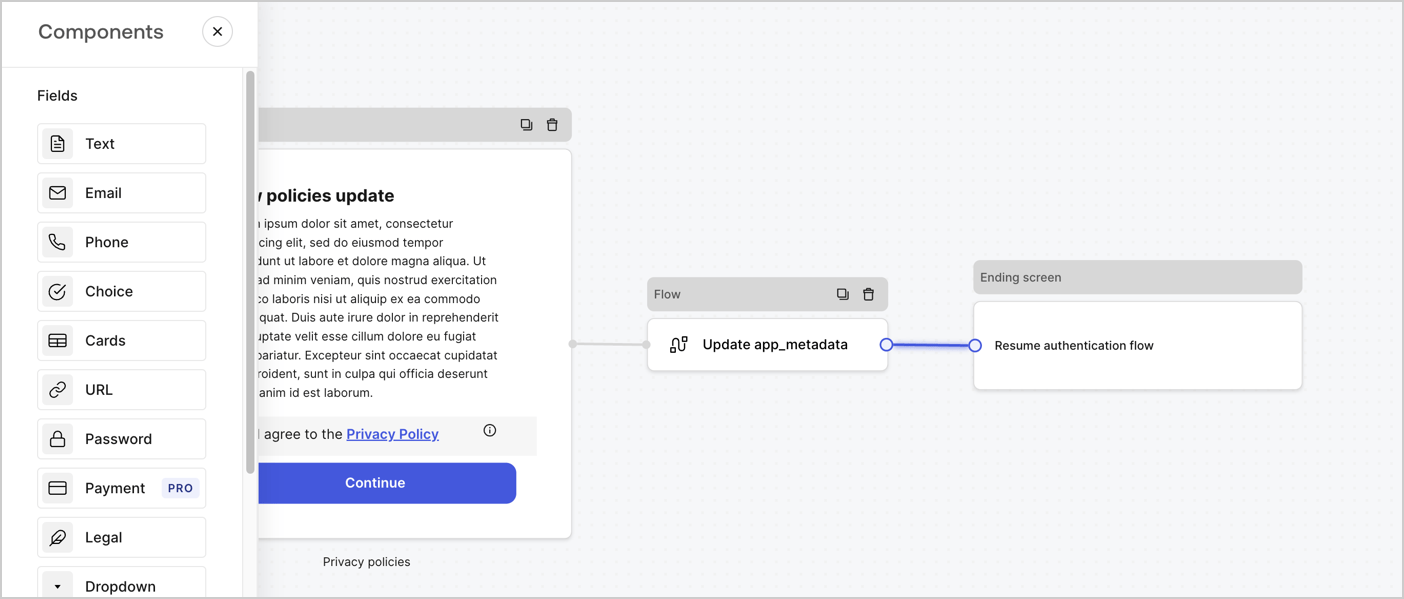
Add a **Flow** node after the **Step** node to update the `app_metadata` and resume the authentication flow by following these steps:

1. Select **Flow** from the bottom of the Form editor.
2. Remove the existing link between the **Step** and **Ending Screen** nodes.
3. Select the new **Flow** > **Click to add a flow** > **Create a new flow.**

   * Enter `Update app_metadata` in the **Name** field.
   * Select **Create**.
   * Select **Save**.
4. Link the **Flow** node to the **Step** and **Ending Screen** nodes as pictured below.
5. Select **Publish** to save.
<Frame>
  <img src="https://mintcdn.com/docs-dev-docs-ia-custom-database-connections/roCEYr1xi1eoO5-8/docs/images/cdy7uua7fh8z/6YIkzm7SrpM9LW76AXuRzh/353c518fe82bbaa440836da1d83596d6/link-policies.png?fit=max&auto=format&n=roCEYr1xi1eoO5-8&q=85&s=6734520b0c19488f0adde225dff8806d" alt="Dashboard > Actions > Forms > Form" data-og-width="1404" width="1404" data-og-height="599" height="599" data-path="docs/images/cdy7uua7fh8z/6YIkzm7SrpM9LW76AXuRzh/353c518fe82bbaa440836da1d83596d6/link-policies.png" data-optimize="true" data-opv="3" srcset="https://mintcdn.com/docs-dev-docs-ia-custom-database-connections/roCEYr1xi1eoO5-8/docs/images/cdy7uua7fh8z/6YIkzm7SrpM9LW76AXuRzh/353c518fe82bbaa440836da1d83596d6/link-policies.png?w=280&fit=max&auto=format&n=roCEYr1xi1eoO5-8&q=85&s=2429e5e3ed75fffa68e684c60b8d15d0 280w, https://mintcdn.com/docs-dev-docs-ia-custom-database-connections/roCEYr1xi1eoO5-8/docs/images/cdy7uua7fh8z/6YIkzm7SrpM9LW76AXuRzh/353c518fe82bbaa440836da1d83596d6/link-policies.png?w=560&fit=max&auto=format&n=roCEYr1xi1eoO5-8&q=85&s=9a38a8f8b53c4bdacd847a07ece93b2f 560w, https://mintcdn.com/docs-dev-docs-ia-custom-database-connections/roCEYr1xi1eoO5-8/docs/images/cdy7uua7fh8z/6YIkzm7SrpM9LW76AXuRzh/353c518fe82bbaa440836da1d83596d6/link-policies.png?w=840&fit=max&auto=format&n=roCEYr1xi1eoO5-8&q=85&s=4490299239b975d23ef046ef890b721d 840w, https://mintcdn.com/docs-dev-docs-ia-custom-database-connections/roCEYr1xi1eoO5-8/docs/images/cdy7uua7fh8z/6YIkzm7SrpM9LW76AXuRzh/353c518fe82bbaa440836da1d83596d6/link-policies.png?w=1100&fit=max&auto=format&n=roCEYr1xi1eoO5-8&q=85&s=d57742a2e986f11f10214282436da206 1100w, https://mintcdn.com/docs-dev-docs-ia-custom-database-connections/roCEYr1xi1eoO5-8/docs/images/cdy7uua7fh8z/6YIkzm7SrpM9LW76AXuRzh/353c518fe82bbaa440836da1d83596d6/link-policies.png?w=1650&fit=max&auto=format&n=roCEYr1xi1eoO5-8&q=85&s=f8fb052b23df1af69fa1add4b6c6ae3f 1650w, https://mintcdn.com/docs-dev-docs-ia-custom-database-connections/roCEYr1xi1eoO5-8/docs/images/cdy7uua7fh8z/6YIkzm7SrpM9LW76AXuRzh/353c518fe82bbaa440836da1d83596d6/link-policies.png?w=2500&fit=max&auto=format&n=roCEYr1xi1eoO5-8&q=85&s=5f356db96e77134b80b3a5e142d590cd 2500w" />
</Frame>

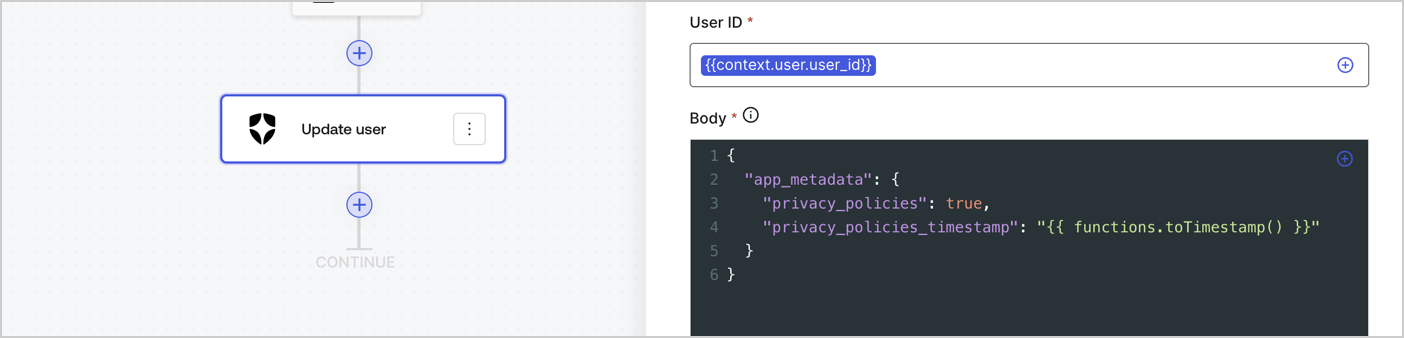
Add an Auth0 Update user action to the flow by following these steps:

1. Select the **Flow** **Update app\_metadata** > **Edit flow** to open the Flow editor in a new tab.
2. Below the StartAction, select the **+** icon to add an **Update user** action. Complete the fields below, then select **Save** to continue.

   * **Connection**: Select from the dropdown the Vault connection to your M2M application.

   * **User ID**: Enter `{{context.user.user_id}}`.

   * **Body**: Copy and paste the following code to update the app\_metadata with the privacy\_policies and privacy\_policies\_timestamp properties.

     ```text lines theme={null}
     {
       "app_metadata": {
         "privacy_policies": true,
         "privacy_policies_timestamp": "{{ functions.toTimestamp() }}"
       }
     }
     ```

   * Select **Save**.
3. Select **Publish** to save.
<Frame>
  <img src="https://mintcdn.com/docs-dev-docs-ia-custom-database-connections/3grkEQQrXXfZFvSA/docs/images/cdy7uua7fh8z/CvMNIwWrOUwaFW4X3G28p/1fb70ae57a20749d9ffaaba8dc0b7e26/update-user-privacy.png?fit=max&auto=format&n=3grkEQQrXXfZFvSA&q=85&s=5dcf05da2b6b2281bceb3ee486dfa500" alt="Dashboard > Actions > Forms > User case privacy policy code" data-og-width="1404" width="1404" data-og-height="338" height="338" data-path="docs/images/cdy7uua7fh8z/CvMNIwWrOUwaFW4X3G28p/1fb70ae57a20749d9ffaaba8dc0b7e26/update-user-privacy.png" data-optimize="true" data-opv="3" srcset="https://mintcdn.com/docs-dev-docs-ia-custom-database-connections/3grkEQQrXXfZFvSA/docs/images/cdy7uua7fh8z/CvMNIwWrOUwaFW4X3G28p/1fb70ae57a20749d9ffaaba8dc0b7e26/update-user-privacy.png?w=280&fit=max&auto=format&n=3grkEQQrXXfZFvSA&q=85&s=a9af3f196f164bb14ab985de33eb2a1f 280w, https://mintcdn.com/docs-dev-docs-ia-custom-database-connections/3grkEQQrXXfZFvSA/docs/images/cdy7uua7fh8z/CvMNIwWrOUwaFW4X3G28p/1fb70ae57a20749d9ffaaba8dc0b7e26/update-user-privacy.png?w=560&fit=max&auto=format&n=3grkEQQrXXfZFvSA&q=85&s=c17825b836e64769f6b8f98bab829616 560w, https://mintcdn.com/docs-dev-docs-ia-custom-database-connections/3grkEQQrXXfZFvSA/docs/images/cdy7uua7fh8z/CvMNIwWrOUwaFW4X3G28p/1fb70ae57a20749d9ffaaba8dc0b7e26/update-user-privacy.png?w=840&fit=max&auto=format&n=3grkEQQrXXfZFvSA&q=85&s=2d0130a13df9dada2472a74b74c17c6c 840w, https://mintcdn.com/docs-dev-docs-ia-custom-database-connections/3grkEQQrXXfZFvSA/docs/images/cdy7uua7fh8z/CvMNIwWrOUwaFW4X3G28p/1fb70ae57a20749d9ffaaba8dc0b7e26/update-user-privacy.png?w=1100&fit=max&auto=format&n=3grkEQQrXXfZFvSA&q=85&s=d47f3cc935f9059739f9c447bc86a317 1100w, https://mintcdn.com/docs-dev-docs-ia-custom-database-connections/3grkEQQrXXfZFvSA/docs/images/cdy7uua7fh8z/CvMNIwWrOUwaFW4X3G28p/1fb70ae57a20749d9ffaaba8dc0b7e26/update-user-privacy.png?w=1650&fit=max&auto=format&n=3grkEQQrXXfZFvSA&q=85&s=051524a850bc7ab1894e07460f732235 1650w, https://mintcdn.com/docs-dev-docs-ia-custom-database-connections/3grkEQQrXXfZFvSA/docs/images/cdy7uua7fh8z/CvMNIwWrOUwaFW4X3G28p/1fb70ae57a20749d9ffaaba8dc0b7e26/update-user-privacy.png?w=2500&fit=max&auto=format&n=3grkEQQrXXfZFvSA&q=85&s=657bc26c2a9f875a017d0379bc2f1639 2500w" />
</Frame>

<Callout icon="file-lines" color="#0EA5E9" iconType="regular">
  The flow **Update app\_metadata** adds a `privacy_policies true` value to the app`_metadata` object and also generates a timestamp with a [helper function.](/docs/customize/forms/variables)
</Callout>

## Retrieve the form render code

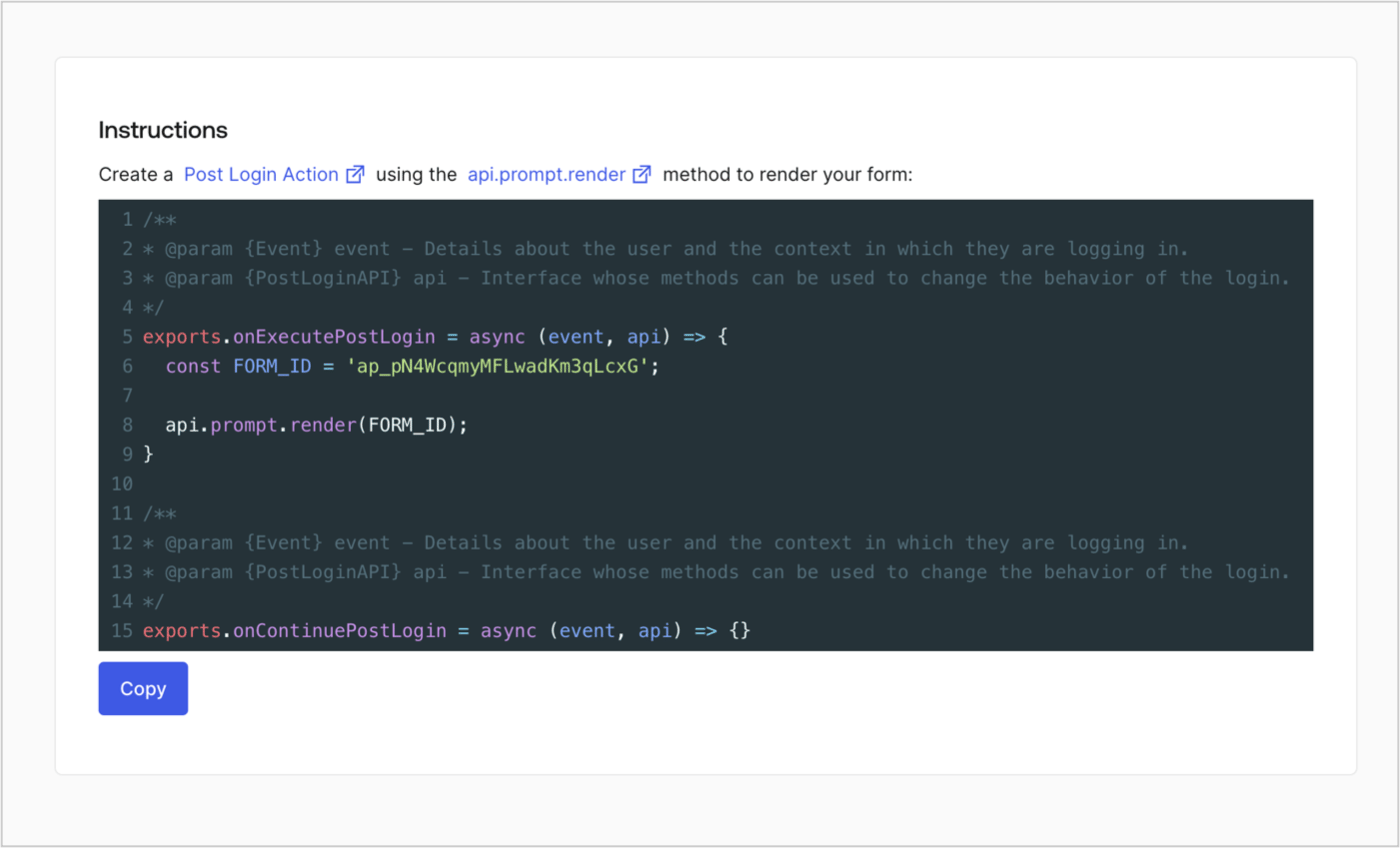
Retrieve your form render code to visually render the form with a custom Post Login Action by following these steps:

* From the Form editor, select **`<> Render`**.
* Select **Copy**.
<Frame>
  <img src="https://mintcdn.com/docs-dev-docs-ia-custom-database-connections/5g8MfhZr__fvj1As/docs/images/cdy7uua7fh8z/2EIUzc539sq9lwoTKbjoJv/496a864c0fc44a782c9cadca119dbfb0/embed.png?fit=max&auto=format&n=5g8MfhZr__fvj1As&q=85&s=2342631e5119cf7574802deb0414bafc" alt="Dashboard > Actions > Forms > Form > Embed" data-og-width="1400" width="1400" data-og-height="848" height="848" data-path="docs/images/cdy7uua7fh8z/2EIUzc539sq9lwoTKbjoJv/496a864c0fc44a782c9cadca119dbfb0/embed.png" data-optimize="true" data-opv="3" srcset="https://mintcdn.com/docs-dev-docs-ia-custom-database-connections/5g8MfhZr__fvj1As/docs/images/cdy7uua7fh8z/2EIUzc539sq9lwoTKbjoJv/496a864c0fc44a782c9cadca119dbfb0/embed.png?w=280&fit=max&auto=format&n=5g8MfhZr__fvj1As&q=85&s=3ea50a9f56417bb32eab75218d41ebce 280w, https://mintcdn.com/docs-dev-docs-ia-custom-database-connections/5g8MfhZr__fvj1As/docs/images/cdy7uua7fh8z/2EIUzc539sq9lwoTKbjoJv/496a864c0fc44a782c9cadca119dbfb0/embed.png?w=560&fit=max&auto=format&n=5g8MfhZr__fvj1As&q=85&s=bbef5312d96a5d96e87905510efd2be6 560w, https://mintcdn.com/docs-dev-docs-ia-custom-database-connections/5g8MfhZr__fvj1As/docs/images/cdy7uua7fh8z/2EIUzc539sq9lwoTKbjoJv/496a864c0fc44a782c9cadca119dbfb0/embed.png?w=840&fit=max&auto=format&n=5g8MfhZr__fvj1As&q=85&s=05c7b1ea940203bbdd76fe2ef460e97f 840w, https://mintcdn.com/docs-dev-docs-ia-custom-database-connections/5g8MfhZr__fvj1As/docs/images/cdy7uua7fh8z/2EIUzc539sq9lwoTKbjoJv/496a864c0fc44a782c9cadca119dbfb0/embed.png?w=1100&fit=max&auto=format&n=5g8MfhZr__fvj1As&q=85&s=4ce619a9e346a46947774de0522c661b 1100w, https://mintcdn.com/docs-dev-docs-ia-custom-database-connections/5g8MfhZr__fvj1As/docs/images/cdy7uua7fh8z/2EIUzc539sq9lwoTKbjoJv/496a864c0fc44a782c9cadca119dbfb0/embed.png?w=1650&fit=max&auto=format&n=5g8MfhZr__fvj1As&q=85&s=416e0627a9c4db3c59e62b4a32bf53fe 1650w, https://mintcdn.com/docs-dev-docs-ia-custom-database-connections/5g8MfhZr__fvj1As/docs/images/cdy7uua7fh8z/2EIUzc539sq9lwoTKbjoJv/496a864c0fc44a782c9cadca119dbfb0/embed.png?w=2500&fit=max&auto=format&n=5g8MfhZr__fvj1As&q=85&s=f0e9ea86aaec02b42f41246b600d0b6b 2500w" />
</Frame>

## Create a Post Login Action

Create a post-login Action to render your form by following these steps:

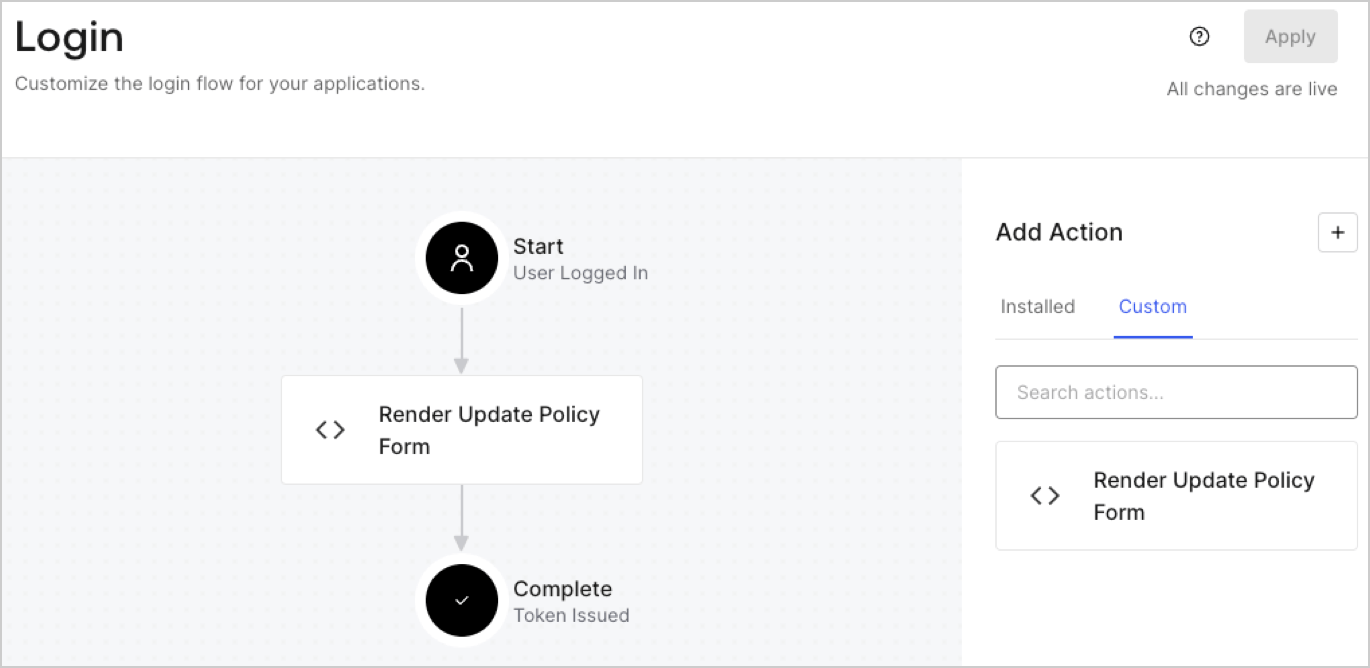
1. Navigate to **Auth0 Dashboard > Actions > Flows > Login.**
2. Select the **+** icon and Select **Build from scratch**:

   * **Name**: Enter `Render Update Policy Form`.
   * **Trigger**: Select `Login / Post Login`.
   * **Runtime**: Select the recommended version.
3. Select **Create**.

To configure the post-login Action:

1. Delete the existing code from the Code editor.
2. Paste the form render code into the Code editor.
3. Edit the code to define the conditional logic that will render the form.

   ```javascript lines theme={null}
   /**
   * @param {Event} event - Details about the user and the context in which they are logging in.
   * @param {PostLoginAPI} api - Interface whose methods can be used to change the behavior of the login.
   */
   exports.onExecutePostLogin = async (event, api) => {
     const FORM_ID = 'REPLACE_WITH_YOUR_FORM_ID';

     if (event.user.app_metadata.privacy_policies !== true) {
       api.prompt.render(FORM_ID);
     }
   }

   exports.onContinuePostLogin = async (event, api) => { }
   ```

   <Callout icon="file-lines" color="#0EA5E9" iconType="regular">
     The example code above will render the form when a user is missing the app metadata `privacy_policies` property.
   </Callout>
4. Select **Deploy.**
5. Drag and Drop the **Render Update Policy Form** Action to the **Login** flow.
   <Frame>
     <img src="https://mintcdn.com/docs-dev-docs-ia-custom-database-connections/QxAQWJ3P1ym1xS1Q/docs/images/cdy7uua7fh8z/5TOwDgevZsBqd7yZynUYWU/41ca909dc3007aed4f40ff794a05efa5/postlogin.png?fit=max&auto=format&n=QxAQWJ3P1ym1xS1Q&q=85&s=cafb5f61964a2fa3b2616e674a3e3477" alt="Dashboard > Forms > Use Case > Render update policy form login action" data-og-width="1370" width="1370" data-og-height="668" height="668" data-path="docs/images/cdy7uua7fh8z/5TOwDgevZsBqd7yZynUYWU/41ca909dc3007aed4f40ff794a05efa5/postlogin.png" data-optimize="true" data-opv="3" srcset="https://mintcdn.com/docs-dev-docs-ia-custom-database-connections/QxAQWJ3P1ym1xS1Q/docs/images/cdy7uua7fh8z/5TOwDgevZsBqd7yZynUYWU/41ca909dc3007aed4f40ff794a05efa5/postlogin.png?w=280&fit=max&auto=format&n=QxAQWJ3P1ym1xS1Q&q=85&s=3634baf460b49ab2d2c3648c3a69d35b 280w, https://mintcdn.com/docs-dev-docs-ia-custom-database-connections/QxAQWJ3P1ym1xS1Q/docs/images/cdy7uua7fh8z/5TOwDgevZsBqd7yZynUYWU/41ca909dc3007aed4f40ff794a05efa5/postlogin.png?w=560&fit=max&auto=format&n=QxAQWJ3P1ym1xS1Q&q=85&s=d80b66003869727f94a09bb1a67865e7 560w, https://mintcdn.com/docs-dev-docs-ia-custom-database-connections/QxAQWJ3P1ym1xS1Q/docs/images/cdy7uua7fh8z/5TOwDgevZsBqd7yZynUYWU/41ca909dc3007aed4f40ff794a05efa5/postlogin.png?w=840&fit=max&auto=format&n=QxAQWJ3P1ym1xS1Q&q=85&s=7c57397ada89b15d019e6b366fc23550 840w, https://mintcdn.com/docs-dev-docs-ia-custom-database-connections/QxAQWJ3P1ym1xS1Q/docs/images/cdy7uua7fh8z/5TOwDgevZsBqd7yZynUYWU/41ca909dc3007aed4f40ff794a05efa5/postlogin.png?w=1100&fit=max&auto=format&n=QxAQWJ3P1ym1xS1Q&q=85&s=1ef293eec17e73c184630b71b1f50717 1100w, https://mintcdn.com/docs-dev-docs-ia-custom-database-connections/QxAQWJ3P1ym1xS1Q/docs/images/cdy7uua7fh8z/5TOwDgevZsBqd7yZynUYWU/41ca909dc3007aed4f40ff794a05efa5/postlogin.png?w=1650&fit=max&auto=format&n=QxAQWJ3P1ym1xS1Q&q=85&s=40ac9042004b13c6cd27ddfe1b9cd654 1650w, https://mintcdn.com/docs-dev-docs-ia-custom-database-connections/QxAQWJ3P1ym1xS1Q/docs/images/cdy7uua7fh8z/5TOwDgevZsBqd7yZynUYWU/41ca909dc3007aed4f40ff794a05efa5/postlogin.png?w=2500&fit=max&auto=format&n=QxAQWJ3P1ym1xS1Q&q=85&s=c9903a2e8e761ebb6a904e702dde8c1c 2500w" />
   </Frame>
6. Select **Apply.**

### Test implementation

Test the implementation by following these steps:

1. Log in with an existing user whose app`_metadata` attribute `privacy_policies` does not have a value.
2. The post-login Action in the Login flow will render the form and prompt for acceptance.
3. Select **Auth0 Dashboard > User Management > Users,** locate the user and verify that the `app_metadata` attribute `privacy_policies` contains a `true` value and a timestamp.
